If your phone still isn’t tracking steps correctly after troubleshooting, try switching to Health Connect. On supported phones, Health Connect can use the phone’s built-in step counter.
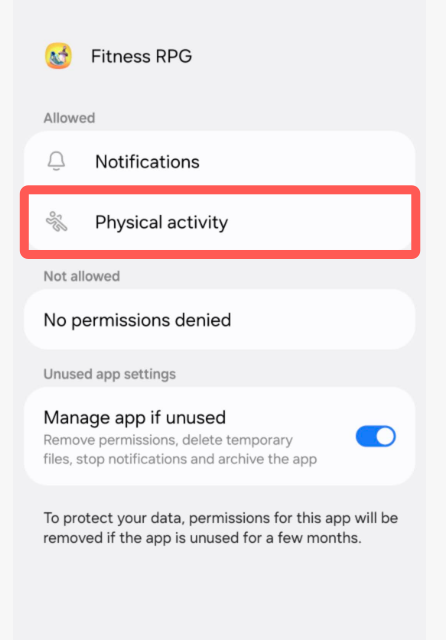
1. Grant the “Physical activity” permission
Make sure you’ve granted Walking RPG permission to access your physical activity. If you previously denied this permission, go to Settings → Apps → Walking RPG → Permissions → Physical activity and allow access.
The screenshots below are from an older version and may show a previous app name.
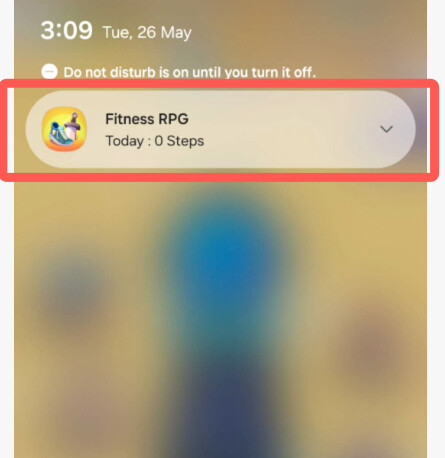
Allow notifications for Walking RPG, then open the game and check your phone’s notification panel. You should see a “Step count” notification. The count should increase as you walk with your phone.
3. Keep Walking RPG running in the background if needed
Some phones require Walking RPG to keep running in the background to track steps. If your phone stops tracking when you leave the game, adjust its battery settings to allow Walking RPG to run in the background so the system doesn’t stop it. See the instructions for your phone’s manufacturer.
If you haven’t set up phone tracking yet, see our setup guide:
My steps are being tracked and it’s showing in my notifications area like you show. But when I enter the game it’s not allowing me to collect any energy. U can easily look at my account and see I got 80k steps an not 80k steps worth of energy. Again today I was only able to get away with 30k steps worth of energy. My game is still in the background otherwise indolent be getting what I’m getting. Even doing small tests of 100 steps and still can’t collect anything.
hey, carlie again.
i let it run in the background and i saw it in my notification bar. i put my device in my pocket and went on a walk yesterday, and when i got home, i checked my steps, and it said 0, so i tried to shake it to make it go up, and it didn’t, so i tried to do the same in the app, because steps seemed to go up while the app was open, and it didnt, so i dont really know whats up.
My steps are being tracked and it’s showing in my notifications area like you show. But when I enter the game it’s not allowing me to collect any energy. U can easily look at my account and see I got 80k steps an not 80k steps worth of energy. Again today I was only able to get away with 30k steps worth of energy. My game is still in the background otherwise indolent be getting what I’m getting. Even doing small tests of 100 steps and still can’t collect anything.
Hi,
It’s the second time I have this problem : Everything is normal, then, with no reason why, steps are not counted anymore in the game. I close the app, reboot my android… nothing works.
The app displayed in the notification bar counts my steps (but the number is not the same as the number shown in game : 159 vs 8932), and the app is still in the background.
Last time, I had to wait 2/3 days then it worked again.
What could I do to be able to play and have my daily 20k steps ?
My ID : zpj499